Salesforce Data Enrichment: Tools, Setup, and Workflows
How to enrich Salesforce data using native features and third-party tools like Clay, ZoomInfo, and Apollo. Covers setup, automation, and measuring results.
Salesforce doesn’t have a built-in enrichment tool. Data.com shut down in 2020, and nothing replaced it natively. So if you want to fill in missing job titles, company revenue, phone numbers, or technographics on your Leads and Contacts, you’re choosing between third-party tools.
That’s not a bad thing. The third-party options are better than Data.com ever was. But it means you need to make decisions about which tools to use, how to connect them, and how to keep data flowing without creating a mess.
This guide covers your options and how to set them up.
What “enrichment” actually means in Salesforce
Before picking tools, it helps to be specific about what you’re trying to do. Enrichment, appending, and enhancement are different things, and the tool you need depends on which problem you have.
Common enrichment goals in Salesforce:
- Fill in missing fields on Leads and Contacts (job title, phone, LinkedIn)
- Add company data to Accounts (revenue, employee count, industry, tech stack)
- Verify and update stale records (data decays at ~70% per year)
- Score and route leads based on enriched firmographics
- Clean up records that arrived incomplete from form fills or imports
Most teams need a mix of these. The tool that fills in phone numbers isn’t always the same tool that adds technographic data.
Your options
Single-source tools
These tools have their own database. You connect them to Salesforce, and they push data in.
- 321M+ contacts, strongest in US enterprise
- Direct dials and org charts
- Native Salesforce integration (managed package)
- Starts around $15K/year
- Best for: enterprise teams doing outbound at scale
- 270M+ contacts, strong in US mid-market
- Built-in email sequences
- Bi-directional Salesforce sync
- $59-149/user/month
- Best for: SMB and mid-market teams that also need outbound
Cognism
- Strong European coverage (GDPR-compliant)
- Good mobile phone data
- Salesforce integration via Chrome extension + sync
- Custom pricing
- Best for: teams selling into EMEA
Lusha
- Simple, fast contact lookups
- Good direct dial coverage
- Chrome extension + Salesforce widget
- $36-59/user/month
- Best for: individual reps who need phone numbers
Multi-source (waterfall) tools
Instead of relying on one database, these tools query multiple providers and return the best result.
- Queries 100+ data providers in waterfall sequence
- Highest possible coverage rates
- Flexible workflows (AI research, custom logic)
- $149-800/month depending on usage
- Best for: teams that need maximum coverage or have unusual enrichment needs
Clearbit (standalone)
- Now owned by HubSpot, but still works via API
- Good company data and technographics
- Real-time enrichment via webhooks
- Pricing based on volume
- Best for: teams already using Clearbit’s API directly
Native Salesforce options
Salesforce doesn’t have enrichment, but it has features that help:
Einstein Activity Capture syncs emails and calendar events to contact records. It’s not enrichment in the traditional sense, but it fills in relationship data.
AppExchange packages from vendors like ZoomInfo, Cognism, and D&B install directly into Salesforce and add enrichment buttons or automated flows to record pages.
Data Cloud (formerly CDP) can ingest data from external sources and unify it with Salesforce records. It’s an enterprise product with enterprise pricing, and it’s more about identity resolution than traditional enrichment.
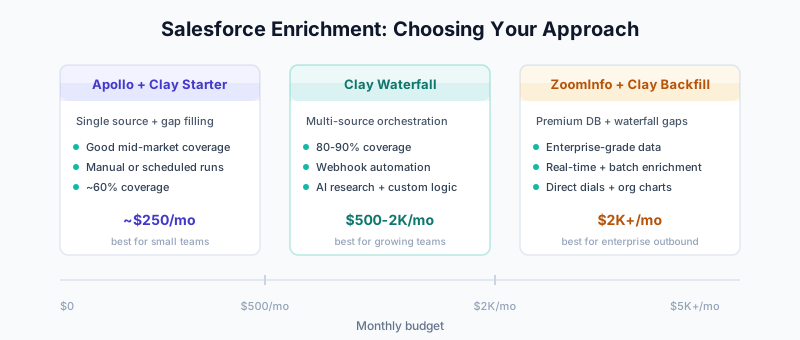
Choosing the right approach
The answer depends on three things: your budget, your ICP geography, and how you want enrichment to trigger.
Budget under $500/month: Apollo (free tier or Basic) for contact data, Clay (Starter) for anything Apollo misses. Run enrichment manually or on a schedule.
Budget $500-2,000/month: Clay as your primary enrichment engine with CRM integration patterns. Automate enrichment on lead creation via webhooks.
Budget $2,000+/month: ZoomInfo or Cognism for your core database + Clay for waterfall fill on gaps. Fully automated with real-time triggers.
Mostly US-based ICP: ZoomInfo or Apollo will have the best coverage.
Selling into Europe: Cognism is worth the premium for GDPR-compliant mobile data.
Mixed geography: Clay’s waterfall approach lets you pull from the best provider per region.
Setting up enrichment in Salesforce
Whatever tool you pick, the setup pattern is similar. Here’s what to get right.
Field mapping
Before connecting anything, map which external fields go to which Salesforce fields. Don’t just auto-map everything — you’ll end up overwriting good data with bad data.
Recommended field mapping:

External Field        → Salesforce Field         → Overwrite Rule
─────────────────────────────────────────────────────────────────
Job Title             → Title                    → Only if blank
Phone (direct)        → Phone                    → Only if blank
Mobile Phone          → MobilePhone              → Only if blank
LinkedIn URL          → LinkedIn_URL__c          → Only if blank
Company Revenue       → AnnualRevenue (Account)  → Only if blank
Employee Count        → NumberOfEmployees (Acct)  → Only if blank
Industry              → Industry (Account)        → Only if blank
Tech Stack            → Tech_Stack__c            → Always update
The “only if blank” rule matters. If a rep manually entered a phone number, you don’t want a batch enrichment job overwriting it with a switchboard number from ZoomInfo.
Create custom fields for enrichment metadata
Add these fields to track what’s been enriched and when:
Custom Fields:
- Enrichment_Source__c (Text) — Which tool enriched this record
- Enrichment_Date__c (DateTime) — When it was last enriched
- Enrichment_Status__c (Picklist) — Enriched / Not Found / Stale
- Data_Completeness_Score__c (Number) — Percentage of key fields filled
These fields make it easy to build reports on enrichment coverage and identify gaps. They’re also useful for building your data quality scorecard.
Duplicate prevention
Enrichment tools can create duplicates if you’re not careful. Two common scenarios:
- Tool creates a new Lead when a matching Contact already exists
- Tool creates a new Account when one with the same domain already exists
Prevention:
- Configure your enrichment tool to match on email (Leads/Contacts) and domain (Accounts)
- Enable Salesforce duplicate rules as a safety net
- Set up matching rules that catch near-duplicates
- Run a deduplication pass before your first big enrichment batch
Automation workflows
Flow 1: Enrich new leads on creation
This is the most common workflow. A lead comes in from a form, import, or API — and gets enriched automatically.
Salesforce Flow: "Enrich New Lead"

Trigger: Record-triggered (Lead, After Create)

Entry Criteria:
  - Email is not blank
  - Email does NOT contain gmail.com, yahoo.com, hotmail.com
  - LeadSource != "Manual Entry"

Action 1: Send HTTP callout to enrichment API
  (Clay webhook, ZoomInfo API, or Apollo API)

Action 2: Wait for async response (Platform Event)

Action 3: Update Lead with enriched fields
  - Apply "only if blank" logic per field
  - Set Enrichment_Source__c = "Clay" (or whichever tool)
  - Set Enrichment_Date__c = NOW()

Action 4: Recalculate lead score
  (if using lead scoring that depends on enriched fields)

Action 5: Run assignment rules
  (route based on enriched firmographics)
The email domain filter is worth noting. Enriching personal email addresses burns credits and returns almost nothing. Filter them out.
Flow 2: Re-enrich stale records
Records go stale. People change jobs. Companies get acquired. A quarterly re-enrichment pass catches the worst of it.
Salesforce Flow: "Re-enrich Stale Records"

Trigger: Scheduled (runs monthly)

Get Records:
  - Object: Lead or Contact
  - Filter: Enrichment_Date__c < 90 days ago
            AND Email is not blank
            AND IsConverted = false (for Leads)

Loop: For each record
  Action: Send to enrichment API
  Action: Update with new data (compare before overwriting)
  Action: Set Enrichment_Date__c = NOW()
Flow 3: Enrich on opportunity creation
When a deal gets created, make sure the Account has full data. Sales reps shouldn’t be researching company info manually at this stage.
Salesforce Flow: "Enrich Account on Opp Creation"

Trigger: Record-triggered (Opportunity, After Create)

Get Related Account

Check: Is Account missing key fields?
  (AnnualRevenue = blank OR NumberOfEmployees = blank OR Industry = blank)

If yes:
  Action: Send Account domain to enrichment API
  Action: Update Account with results
Flow 4: Enrichment + lead routing
Enrichment data makes routing smarter. Instead of routing on lead source alone, route on company size, industry, or tech stack.
Salesforce Flow: "Route Enriched Lead"

Trigger: Field update (Enrichment_Status__c changed to "Enriched")

Decision:
  IF NumberOfEmployees > 500 AND Industry = "Technology"
    → Assign to Enterprise AE team

  IF NumberOfEmployees 50-500
    → Assign to Mid-Market SDR team

  IF NumberOfEmployees < 50
    → Assign to SMB automated nurture

Action: Send Slack notification to assigned rep
  Include: Name, Company, Title, Revenue, Tech Stack
Measuring results
Track these to know if enrichment is working.
Enrichment rate: What percentage of records get successfully enriched? If you’re below 50%, your tool’s coverage might not match your ICP. Try a different provider or add a waterfall layer.
Field fill rate: Look at specific fields. You might have 80% coverage on job titles but only 30% on direct dials. That tells you where to add a second source.
Lead routing accuracy: Are leads going to the right reps after enrichment? Check by looking at how often reps transfer leads they received.
Speed to contact: Enrichment should shorten the time between lead creation and first outreach. Measure the gap before and after enabling enrichment.
Cost per enriched record: Total enrichment spend divided by successfully enriched records. Compare this against what manual research costs (typically $5-15 per record for an SDR’s time).
Example ROI calculation:

Monthly enrichment cost: $800 (Clay Pro)
Records enriched: 3,000
Successful enrichments: 2,100 (70% hit rate)
Cost per enrichment: $0.38

SDR manual research time saved: 2,100 records x 5 min each = 175 hours
SDR hourly cost: ~$30
Manual research cost avoided: $5,250

Monthly ROI: $5,250 saved / $800 spent = 6.5x return
That doesn’t count the downstream revenue impact of faster routing and better-targeted outreach, which is harder to measure but usually larger than the time savings.
Common problems
Enrichment overwriting good data. Usually means your field mapping doesn’t have “only if blank” logic. Fix the mapping, then audit what got overwritten.
Low hit rates. Either your ICP doesn’t match the provider’s coverage (e.g., using a US-focused tool for European prospects), or you’re sending personal email addresses. Filter to business domains first, then evaluate coverage.
API rate limits. If you’re enriching thousands of records at once, you’ll hit rate limits. Batch your requests and add delays between calls. Most enrichment APIs document their limits clearly.
Duplicate records appearing. Your duplicate rules aren’t catching matches before the enrichment tool creates new records. Tighten your matching rules and configure the tool to update-not-create.
Enriched data looks wrong. Common with people who recently changed jobs — the enrichment tool still has their old title. Cross-reference with LinkedIn for high-value leads. Consider adding a verification step for records going to enterprise AEs.
Related guides
- ZoomInfo Implementation Guide — Enterprise enrichment setup
- Apollo.io Implementation Guide — Mid-market enrichment + outbound
- Clay 101 — Multi-source enrichment platform
- Waterfall Enrichment — Maximum coverage approach
- Clay + CRM Integration Patterns — Connecting Clay to Salesforce
- Salesforce Duplicate Rules — Prevent enrichment duplicates
- Salesforce Matching Rules — Configure match logic
- Salesforce Data Quality Scorecard — Measure data quality
- B2B Data Decay Problem — Why re-enrichment matters
- Enrichment ROI Calculation — Detailed ROI framework