HubSpot Data Enrichment: Native and Third-Party Options Compared
How to enrich HubSpot data using Breeze Intelligence, Clay, Apollo, and other tools. Covers setup, workflows, and when to use native vs external enrichment.
HubSpot has something most CRMs don’t: a built-in enrichment tool. When HubSpot acquired Clearbit in 2024, they baked it into the platform as Breeze Intelligence. It works. But it doesn’t cover everything, and it’s not free.
So the real question isn’t “should I enrich my HubSpot data?” It’s “should I use Breeze, a third-party tool, or both?”
This guide helps you decide, then walks through how to set it up.
What Breeze Intelligence covers (and what it doesn’t)
Breeze uses Clearbit’s database of 400M+ contacts and 50M+ companies. When a record enters HubSpot, Breeze fills in the gaps: job title, company size, industry, tech stack, LinkedIn profile.
What Breeze does well:
- Company firmographics (revenue, headcount, industry)
- Job titles and seniority levels
- Technographic data (what software a company uses)
- Automatic re-enrichment every 30 days
- Form shortening (fewer fields, same data)
Where Breeze falls short:
- Phone numbers, especially direct dials. Breeze is email-and-company focused.
- Coverage outside the US drops off. European and APAC contacts get enriched at roughly half the US rate.
- No intent data. You get firmographics, not buying signals.
- Credits cost money and don’t roll over month to month.
As one TrustRadius reviewer (Director of Marketing, mid-market) put it: “Email quality is good but mobile number data needs improvement.” That tracks with what most teams find — Breeze is strong on firmographics, weaker on direct dials.
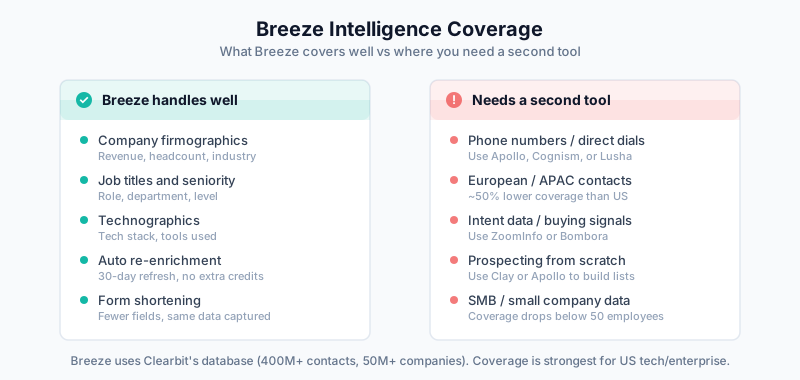
If your ICP is US-based tech companies and you mainly need firmographic data, Breeze might be all you need. If you’re doing outbound and need phone numbers, or selling into Europe, you’ll need to supplement it.
For a deep dive on Breeze setup and credit optimization, see the full Breeze Intelligence guide.
Third-party enrichment options
Single-source tools
- 270M+ contacts with bi-directional HubSpot sync
- Good phone number coverage
- Built-in email sequences
- $59-149/user/month
- Best when you need enrichment + outbound in one tool
- 321M+ contacts, strongest US enterprise coverage
- Direct dials, org charts, intent data
- HubSpot integration via native connector
- Starts around $15K/year
- Best for enterprise teams with budget
Cognism
- Strong in Europe (GDPR-compliant mobile numbers)
- Good direct dial data globally
- HubSpot integration via Chrome extension + sync
- Custom pricing
- Best for teams selling into EMEA
Lusha
- Fast, simple contact lookups
- Decent direct dial coverage
- HubSpot widget built in
- $36-59/user/month
- Best for individual reps who need phone numbers now
Multi-source (waterfall) tools
- Queries 100+ data providers in a waterfall sequence
- Returns the best result from whichever provider has it
- Flexible enough for custom research workflows
- $149-800/month depending on credits
- Best for maximum coverage or unusual enrichment needs
Breeze vs third-party: when to use what
Here’s how to think about it:
| Scenario | Use Breeze | Use third-party | Use both |
|---|---|---|---|
| Need firmographics only | Yes | ||
| Need phone numbers | Yes (Apollo, Cognism, Lusha) | ||
| US tech ICP, inbound-heavy | Yes | ||
| European prospects | Yes (Cognism) | ||
| High-volume outbound | Yes (Apollo, ZoomInfo) | Yes | |
| Want maximum coverage | Yes (Breeze + Clay waterfall) | ||
| Budget under $200/month | Yes (Apollo free/Basic) | ||
| Already paying for HubSpot Pro | Yes |
Most teams doing serious outbound end up using both. Breeze handles the real-time enrichment when leads come in through forms, and a tool like Clay or Apollo fills gaps and adds phone data for outbound lists. The practical upside is real — as Fraser Murphy (Sales Team Leader, Workable) noted in his TrustRadius review, enrichment meant “less need for SDRs to ‘google search’ as the information is to hand.”
Setting up enrichment in HubSpot
Option A: Breeze Intelligence only
If Breeze covers your needs:
- Go to Settings > Data Management > Data Enrichment
- Turn on automatic enrichment
- Choose which objects to enrich (Contacts, Companies)
- Configure which properties Breeze should populate
- Set up credit allocation (don’t enrich personal email domains)
See the full Breeze setup guide for credit optimization strategies.
Option B: Third-party tool only
If you’re skipping Breeze (maybe you’re on HubSpot Starter, or Breeze’s coverage doesn’t fit your ICP):
Using Apollo:
- Go to Apollo > Settings > Integrations > HubSpot
- Connect via OAuth
- Configure bi-directional sync
- Map fields (see mapping table below)
- Set duplicate handling to “update existing, match on email”
Using Clay:
- Create a Clay table with your enrichment columns
- Connect HubSpot as a source (pull contacts/companies)
- Add enrichment steps (waterfall pattern)
- Push results back to HubSpot via native integration
Option C: Breeze + third-party (recommended for outbound teams)
Use Breeze for real-time enrichment on inbound, and a second tool for batch enrichment and gap-filling.
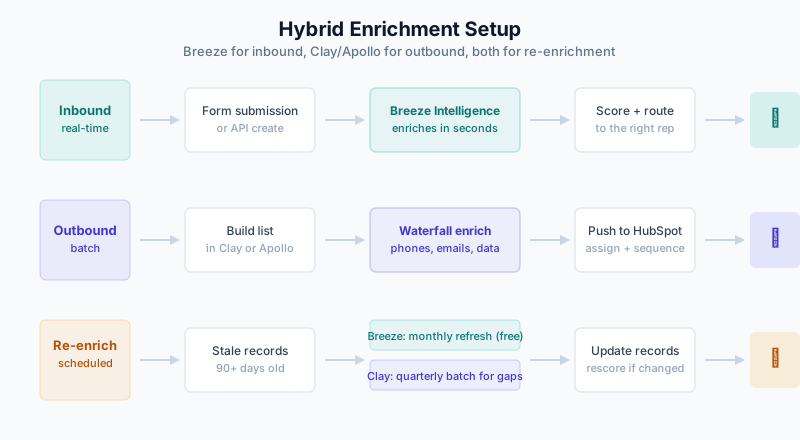
Inbound flow:
  Form submission → Breeze enriches automatically → Lead scored and routed

Outbound flow:
  Build list in Clay/Apollo → Enrich with waterfall → Push to HubSpot
  → Assign to rep → Begin sequence

Re-enrichment:
  Breeze refreshes monthly (free, no credits)
  Run Clay batch quarterly for records Breeze missed
Field mapping
Whatever tool you use, map fields deliberately. Don’t auto-map everything.
Recommended mapping:

External Field        → HubSpot Property          → Overwrite Rule
─────────────────────────────────────────────────────────────────
Job Title             → jobtitle                   → Only if blank
Phone (direct)        → phone                      → Only if blank
Mobile Phone          → mobilephone                → Only if blank
LinkedIn URL          → linkedin_url (custom)       → Only if blank
Company Revenue       → annualrevenue               → Only if blank
Employee Count        → numberofemployees            → Only if blank
Industry              → industry                    → Only if blank
Tech Stack            → tech_stack (custom)          → Always update
“Only if blank” prevents enrichment from overwriting data a rep entered manually. Tech stack is the exception because it changes frequently and automated data is usually more current than what a rep typed in months ago.
Create tracking properties
Add custom properties to track enrichment status:
- Enrichment Source (dropdown) — Breeze, Clay, Apollo, Manual
- Last Enriched Date (date) — When the record was last enriched
- Enrichment Status (dropdown) — Enriched, Not Found, Stale, Needs Review
These make it easy to build reports and identify records that need attention.
Workflows
Workflow 1: Enrich and route new contacts
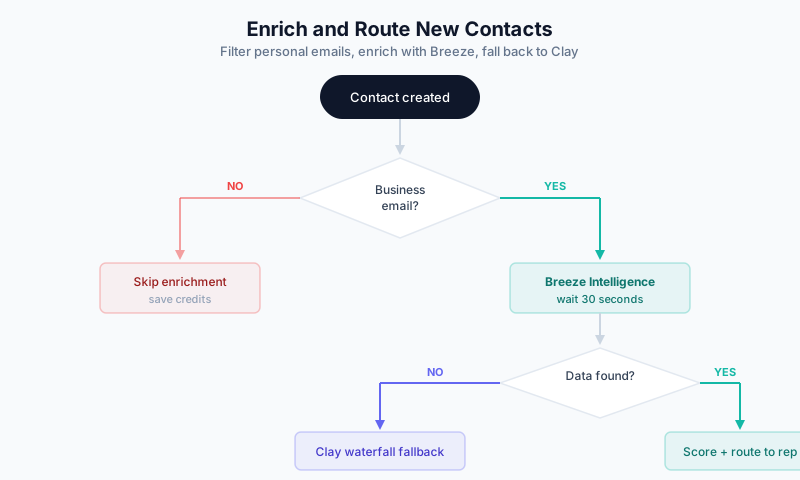
Trigger: Contact is created

Branch 1: Email domain check
  IF email contains gmail.com, yahoo.com, hotmail.com, outlook.com
    → Skip enrichment (don't burn credits on personal emails)
    → Add to "Personal Email" list for manual review

Branch 2: Business email
  → Wait 30 seconds (let Breeze finish)
  → Check: Is Company Name populated?

  IF yes (Breeze found data):
    → Score lead based on enriched firmographics
    → Route to appropriate rep/team

  IF no (Breeze missed):
    → Send webhook to Clay for waterfall enrichment
    → Wait for response
    → Route based on Clay data
Workflow 2: Quarterly re-enrichment
Trigger: Scheduled (first Monday of each quarter)

Enrollment: Contact list where
  - Last Enriched Date is more than 90 days ago
  - Email is known
  - Lifecycle Stage is not "Customer" (don't waste credits on existing customers
    unless you want to — some teams do this for expansion signals)

Actions:
  → Send to Clay via webhook (batch)
  → Update Last Enriched Date
  → Update Enrichment Source
  → Recalculate lead score if data changed
Workflow 3: Enrich when deal is created
Trigger: Deal is created

Get associated Company

Check: Is Company missing key fields?
  (annualrevenue is unknown OR numberofemployees is unknown)

IF yes:
  → Trigger Breeze enrichment on Company
  → Wait 30 seconds
  → If still blank, send to Clay webhook

Notify deal owner with enriched company data via email or Slack
Workflow 4: Combine with data quality automation
If you’re on Operations Hub, chain enrichment with data cleanup:
Trigger: Contact is created

Step 1: Format phone number (Operations Hub)
Step 2: Capitalize name properly (Operations Hub)
Step 3: Breeze enrichment (automatic)
Step 4: Check for duplicates
Step 5: Calculate data completeness score
Step 6: Route based on enriched + cleaned data
Measuring results
Enrichment rate by source. What percentage of records does each tool successfully enrich? If Breeze hits 65% and Clay catches another 20% of what Breeze missed, your combined rate is around 72%. Track these separately so you know what each tool is contributing.
Field-level fill rates. Don’t just look at overall enrichment. Break it down: email coverage might be 90% while direct dial coverage is 35%. That granularity tells you where to invest.
Form conversion impact. If you’re using Breeze’s form shortening, compare conversion rates before and after. Most teams see a 10-25% lift when they cut forms from 6+ fields down to 2-3.
Cost per enriched record. Add up all your enrichment spend (Breeze credits + third-party tools) and divide by successfully enriched records.
Example:

Breeze Intelligence: $500/month (5,000 credits)
Clay Pro: $350/month
Total: $850/month

Records enriched by Breeze: 3,500
Records enriched by Clay (Breeze gaps): 800
Total enriched: 4,300

Cost per enrichment: $850 / 4,300 = $0.20/record
Compare that to manual research at $5-15 per record, and the math works out fast.
Speed to first touch. Enrichment should reduce the time between lead creation and first rep contact. If reps were spending 10 minutes researching each lead and now spend zero, that’s measurable.
Common problems
Breeze and a third-party tool are fighting over the same fields. This happens when both tools try to write to the same property. Set clear ownership: Breeze writes on creation (real-time), third-party tools only write to fields Breeze left blank. Use your “only if blank” mapping rules.
Credits running out mid-month. Either you’re enriching too many personal email addresses (filter those out first), or your volume exceeds your tier. One user shared on r/hubspot: “Unknown to me, automatic enrichment was turned on in HubSpot… Might have just cost my company $11k.” (The original Reddit post has since been removed, but the quote was documented by Skrapp.io.) Check your credit usage dashboard and tighten enrollment criteria in your workflows before you end up in the same spot.
Duplicate contacts after enrichment. This is common enough that G2 reviewers flag it — “lots of inaccuracies and duplicative data” was one Clearbit review’s summary. The cause: your third-party tool is creating new contacts instead of updating existing ones. Configure it to match on email address and update rather than create. Also enable HubSpot’s native deduplication.
Enriched data doesn’t match LinkedIn. The person probably changed jobs recently. Enrichment databases lag real life by weeks or months. For high-value prospects, have reps verify against LinkedIn before outreach. Breeze’s 30-day refresh helps, but it’s not instant.
Low coverage for European contacts. Clearbit/Breeze has weaker coverage outside the US. Add Cognism or use Clay’s waterfall to pull from European-focused providers.
Related guides
- HubSpot Breeze Intelligence Guide — Deep dive on native enrichment
- HubSpot Operations Hub Data Quality — Chain enrichment with cleanup
- HubSpot Duplicate Management — Prevent enrichment duplicates
- HubSpot Import Best Practices — Enrich before or after import
- Clay 101 — Multi-source enrichment platform
- Waterfall Enrichment — Maximum coverage approach
- Clay + CRM Integration Patterns — Connecting Clay to HubSpot
- Apollo.io Implementation Guide — Apollo + HubSpot setup
- B2B Data Decay Problem — Why re-enrichment matters
- Enrichment ROI Calculation — Detailed ROI framework