Data Provider Accuracy Testing: A Methodology
Test and compare data enrichment providers objectively. Learn how to measure coverage, accuracy, and freshness across ZoomInfo, Apollo, Cognism, and more.
Every data provider claims 95%+ accuracy. These claims are often based on favorable conditions and cherry-picked segments. The only way to know what works for your business is to test.
This guide provides a methodology for objectively testing data providers.
Why Test?
Providers perform differently across:
- Geography — US vs EU vs APAC
- Company size — Enterprise vs SMB
- Industry — Tech vs Healthcare vs Finance
- Data type — Emails vs phones vs firmographics
What works for one company may not work for you. Testing reveals:
- Which provider covers your ICP best
- How accurate the data actually is
- Which provider offers best value
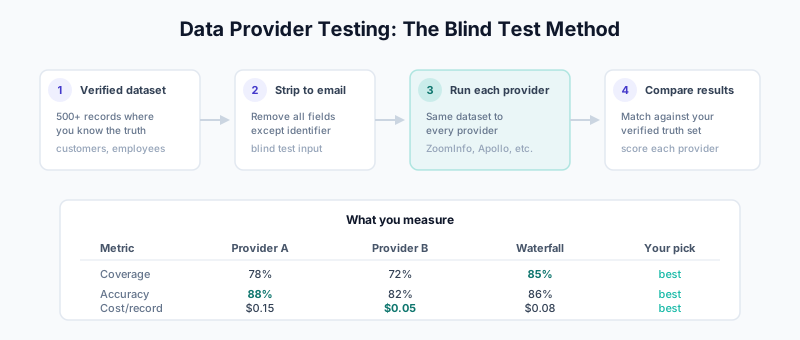
Testing Framework
Metrics to Measure
1. Coverage Rate
   = Records with data returned / Total records tested

2. Accuracy Rate
   = Correct values / Values returned

3. Freshness
   = Records with current data / Records tested

4. Cost Efficiency
   = Cost per accurate record

5. Field Coverage
   = Fields populated / Fields requested
Test Design
Sample Requirements:
Minimum sample size: 500 records
Recommended: 1,000+ records

Sample composition:
- Represent your ICP
- Include various segments (size, industry, geo)
- Mix of known and unknown records
Control Group:
Use records where you know the truth:
- Recently verified customers
- Internal team contacts
- Manually researched prospects
Step-by-Step Testing Process
Step 1: Prepare Test Dataset
Create a dataset of records where you know the correct values:
Test Dataset Structure:

record_id,email,first_name,last_name,title,company,phone,linkedin_url,verified_date,source
1,[email protected],John,Smith,VP Sales,Acme Inc,5551234567,linkedin.com/in/johnsmith,2026-01-15,customer
2,[email protected],Jane,Doe,Director Marketing,Example Corp,5559876543,linkedin.com/in/janedoe,2026-01-10,manual_research
...
Sources for verified data:
- Recent customer wins (sales has verified)
- Internal employees (you know the truth)
- LinkedIn connections (can verify yourself)
- Recent conference attendees (badge scans)
Step 2: Strip Data for Blind Test
Remove all data except email (or minimum identifier):
Test Input:

record_id,email
1,[email protected]
2,[email protected]
...
Step 3: Run Through Each Provider
Submit the same dataset to each provider:
Providers to test:
- ZoomInfo
- Apollo
- Cognism
- Clearbit/Breeze
- Lusha
- [Any others you're considering]

For each provider:
1. Submit test dataset
2. Record enrichment results
3. Note which records returned data
4. Track cost/credits used
Step 4: Compare Results
Merge provider results with your verified data:
Results Structure:

record_id | field      | verified_value | provider_a | provider_b | provider_c
----------|------------|----------------|------------|------------|------------
1         | title      | VP Sales       | VP Sales   | VP, Sales  | Dir Sales
1         | phone      | 5551234567     | 5551234567 | NULL       | 5551234567
1         | company    | Acme Inc       | Acme Inc   | Acme       | ACME Inc
2         | title      | Dir Marketing  | Dir Mktg   | Director   | NULL
...
Step 5: Calculate Metrics
Coverage Rate:
def coverage_rate(results, field):
    total = len(results)
    with_data = sum(1 for r in results if r[field] is not None)
    return with_data / total * 100

# Example
coverage = {
    'provider_a': coverage_rate(results, 'title'),
    'provider_b': coverage_rate(results, 'title'),
    'provider_c': coverage_rate(results, 'title'),
}
Accuracy Rate:
def accuracy_rate(results, field, verified_field):
    with_data = [r for r in results if r[field] is not None]
    if not with_data:
        return 0

    correct = sum(1 for r in with_data if fuzzy_match(r[field], r[verified_field]))
    return correct / len(with_data) * 100

def fuzzy_match(value1, value2):
    # Implement fuzzy comparison
    # Account for "VP Sales" == "VP, Sales" == "Vice President Sales"
    pass
Effective Rate (Coverage × Accuracy):
def effective_rate(coverage, accuracy):
    return coverage * accuracy / 100

# This is often the most useful single metric
# High coverage with low accuracy isn't valuable
# Low coverage with high accuracy misses too many records
Testing Specific Data Types
Email Testing
Test approach:
1. Get emails from each provider
2. Run through email verification (NeverBounce, ZeroBounce)
3. Count: valid, invalid, catch-all, unknown

Metrics:
- Coverage: % of records with email returned
- Deliverability: % of returned emails that verify as valid
- Effective: Coverage × Deliverability

Example Results:
Provider   | Coverage | Deliverability | Effective
-----------|----------|----------------|----------
ZoomInfo   | 78%      | 92%            | 72%
Apollo     | 72%      | 88%            | 63%
Cognism    | 65%      | 95%            | 62%
Phone Testing
Test approach:
1. Get phone numbers from each provider
2. Attempt to verify (ideally, actually call sample)
3. Track: connected, disconnected, wrong number, voicemail

Metrics:
- Coverage: % of records with phone returned
- Connect rate: % of phones that actually reach person
- Direct dial rate: % that are direct (not main line)

Example Results:
Provider   | Coverage | Connect | Direct
-----------|----------|---------|-------
ZoomInfo   | 58%      | 72%     | 65%
Cognism    | 52%      | 78%     | 82%
Lusha      | 48%      | 80%     | 88%
Title/Seniority Testing
Test approach:
1. Get titles from each provider
2. Compare to known titles
3. Account for variations (VP Sales = Vice President Sales)

Accuracy levels:
- Exact match
- Semantic match (same meaning, different words)
- Level match (correct seniority, different title)
- Mismatch (wrong person or outdated)

Example Results:
Provider   | Coverage | Exact | Semantic | Level | Mismatch
-----------|----------|-------|----------|-------|----------
ZoomInfo   | 82%      | 45%   | 30%      | 15%   | 10%
Apollo     | 75%      | 40%   | 28%      | 18%   | 14%
Clearbit   | 70%      | 50%   | 25%      | 12%   | 13%
Company Data Testing
Fields to test:
- Company name matching
- Industry accuracy
- Employee count accuracy
- Revenue accuracy
- Technology stack accuracy

Example Results (Employee Count):
Provider   | Coverage | Within 20% | Within 50% | Way off
-----------|----------|------------|------------|----------
ZoomInfo   | 88%      | 72%        | 85%        | 15%
Clearbit   | 85%      | 68%        | 82%        | 18%
Apollo     | 80%      | 60%        | 78%        | 22%
Segment Analysis
Test performance across different segments:
By Company Size
Provider A Performance by Segment:

Segment      | Coverage | Accuracy | Effective
-------------|----------|----------|----------
Enterprise   | 85%      | 90%      | 77%
Mid-Market   | 75%      | 85%      | 64%
SMB          | 60%      | 75%      | 45%
By Geography
Provider B Performance by Geography:

Region       | Coverage | Accuracy | Effective
-------------|----------|----------|----------
US           | 80%      | 88%      | 70%
UK           | 70%      | 85%      | 60%
Germany      | 55%      | 82%      | 45%
France       | 50%      | 80%      | 40%
APAC         | 35%      | 75%      | 26%
By Industry
Provider C Performance by Industry:

Industry     | Coverage | Accuracy | Effective
-------------|----------|----------|----------
Technology   | 82%      | 90%      | 74%
Finance      | 75%      | 88%      | 66%
Healthcare   | 65%      | 85%      | 55%
Manufacturing| 55%      | 80%      | 44%
Cost Analysis
Factor in cost when comparing:
Cost per Accurate Record:

Provider   | Credit Cost | Accuracy | Coverage | Cost/Accurate
-----------|-------------|----------|----------|---------------
ZoomInfo   | $0.15       | 88%      | 78%      | $0.22
Apollo     | $0.05       | 82%      | 72%      | $0.08
Cognism    | $0.12       | 85%      | 65%      | $0.22
Lusha      | $0.08       | 84%      | 48%      | $0.20

Calculation:
Cost per accurate = Credit cost / (Accuracy × Coverage)
Freshness Testing
Data decays. Test how current each provider’s data is:
Method 1: Compare to Known Changes
Use records where you know when data changed:
- Employees who recently changed jobs
- Companies that recently got acquired
- People who recently got promoted

Freshness Score:
- Reflects current state: Fresh
- Reflects 1-3 months ago: Stale
- Reflects 3+ months ago: Very stale
Method 2: LinkedIn Verification
Sample 100 records from each provider
Check against LinkedIn
Score: What % reflects current LinkedIn profile?

Results:
Provider   | Matches Current | 1-3 Months Old | 3+ Months Old
-----------|-----------------|----------------|---------------
ZoomInfo   | 75%             | 15%            | 10%
Apollo     | 70%             | 18%            | 12%
Cognism    | 80%             | 12%            | 8%
Testing Waterfall Effectiveness
Test waterfall enrichment vs single source:
Test Design:

Group A: ZoomInfo only
Group B: Apollo only
Group C: ZoomInfo → Apollo waterfall
Group D: Apollo → ZoomInfo waterfall

Results:
Group      | Coverage | Accuracy | Effective | Cost/Record
-----------|----------|----------|-----------|------------
ZoomInfo   | 78%      | 88%      | 69%       | $0.15
Apollo     | 72%      | 82%      | 59%       | $0.05
Z→A        | 85%      | 86%      | 73%       | $0.12
A→Z        | 84%      | 85%      | 71%       | $0.08

Insight: Waterfall improves coverage significantly
Best value: Apollo first, ZoomInfo for gaps
Ongoing Monitoring
Don’t just test once. Provider quality changes:
Monthly Sampling
Process:
1. Sample 100 new records monthly
2. Verify subset manually or via calls
3. Track trends over time

Dashboard:
Month    | Provider A Accuracy | Provider B Accuracy
---------|---------------------|---------------------
Jan 2026 | 88%                 | 82%
Feb 2026 | 87%                 | 83%
Mar 2026 | 85%                 | 84%
Apr 2026 | 84%                 | 85%

Alert if: Any provider drops >5% month-over-month
Sales Team Feedback
Track rep-reported data issues:
- "Phone was disconnected"
- "Person changed jobs"
- "Wrong company"

Aggregate by provider to spot quality degradation
Reporting Template
Executive Summary
Data Provider Evaluation: Q1 2026

Recommendation: Primary: [Provider A], Secondary: [Provider B]

Key Findings:
1. Provider A has highest accuracy for our ICP (Enterprise US)
2. Provider B offers best coverage for EU region
3. Waterfall enrichment improves coverage by 15%

Cost Analysis:
- Provider A: $X/month for Y records
- Provider B: $Z/month for W records
- Projected annual cost: $XYZ
- Projected ROI: ABC%
Detailed Results
Accuracy by Data Type:
[Include table comparing providers across email, phone, title, company]

Accuracy by Segment:
[Include table comparing providers across company size, geography, industry]

Cost Efficiency:
[Include cost per accurate record analysis]

Recommendations:
1. Use [Provider A] for [use case]
2. Use [Provider B] for [use case]
3. Implement waterfall with [Provider A → Provider B]
4. Re-evaluate in Q2 with focus on [emerging need]
Related Guides
- Waterfall Enrichment — Use multiple providers effectively
- ZoomInfo Implementation — Enterprise provider guide
- Apollo Implementation — Mid-market provider guide
- Enrichment ROI Calculation — Measure provider value
- The B2B Data Decay Problem — Why freshness matters
- 2026 RevOps Data Stack — Full stack architecture